

How to Validate Your Email List
Reduce Costs with These Simple Email Validation Tips

Email marketing is one of the highest ROI digital channels, but its success depends on one critical factor: email list quality. A dirty email list leads to higher bounce rates, wasted marketing spend, and damage to your sender's reputation—potentially landing your emails in spam.
What if you could ensure your emails reach real people—without relying on expensive validation services? While many email verification tools require payment, several free methods—such as regex validation, double opt-in, and limited free email validation APIs—can help keep your list clean and deliverable.
This guide will walk you through email validation strategies that work across any platform (ESP, CRM, or CDP), helping you improve deliverability and reduce unnecessary email costs.
This guide will walk you through email validation strategies, if you need help with Deliverability & Inbox Placement feel free to read the following article.

How to Ensure Clean Email Data at the Point of Collection
The best way to maintain a clean email list is to prevent bad data from entering your system in the first place. This applies whether you're using a CRM, ESP, or CDP.
Owned Data Sources (Website Forms, Lead Capture Tools)
These are sign-up forms that you control, such as:
Newsletter subscriptions
Account registrations
Checkout sign-ups
Pop-ups & overlays
Collecting email addresses at these touchpoints is your first opportunity to ensure data quality. If invalid or fake emails enter your system, they can lead to deliverability issues, increased costs, and poor campaign performance.
To prevent this, follow these best practices.
Best Practices for Collecting Valid Emails from Forms
1️.) Use the Correct Email Input Type (W3C Standard).
Always use
<input type="email">in forms to ensure browsers automatically block invalid formats (e.g., missing @).
<input type="email" id="email" name="email" required>2️.) Apply regex validation for a stricter email format check.
While
<input type="email">prevents major errors, and regex validation ensures stricter compliance.<input type="email" id="email" name="email" pattern="^[a-zA-Z0-9._+-]+@[a-zA-Z0-9-]+(\.[a-zA-Z]{2,63})+$" required>
✅ Prevents:
❌ john@domain (missing .com)
❌ test@@gmail.com (double @)
❌ admin@domain..com (double dots in the domain)
3.) Avoid Automatic Email Corrections
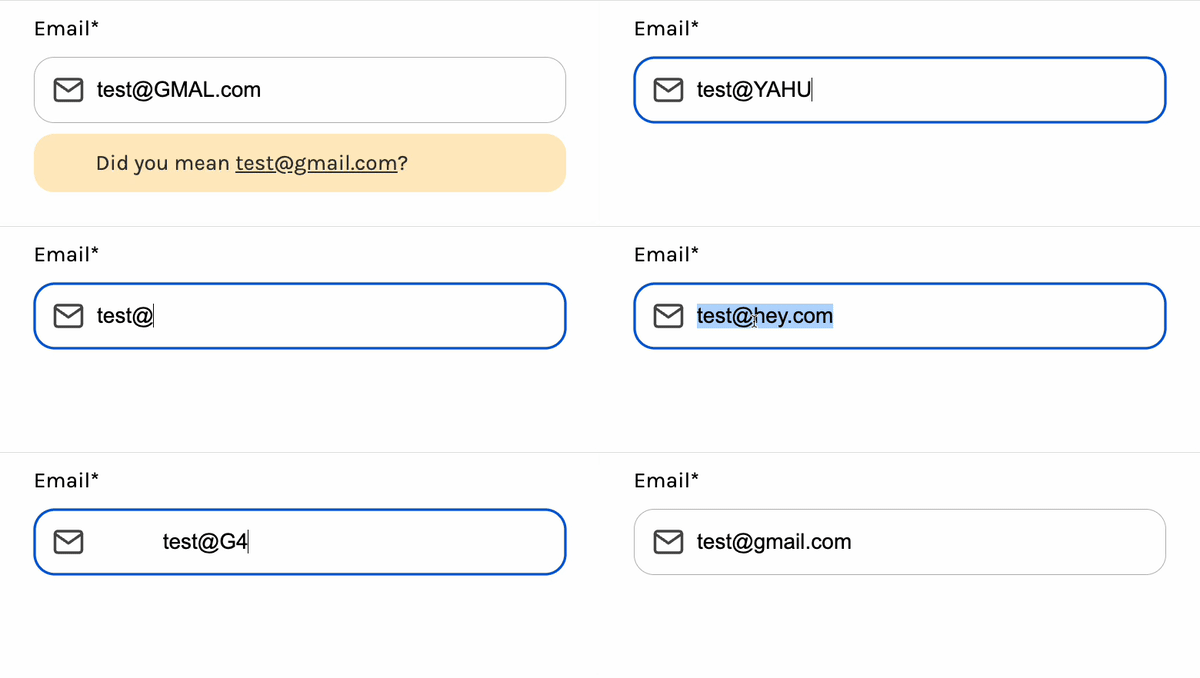
While it may seem helpful to correct common typos (e.g., @gmal.com → @gmail.com), automatically modifying user input is not recommended. Adjusting an email address without explicit user consent can lead to compliance issues and potential legal risks.
Best Practice Instead:
✅ Use real-time validation – Implement front-end validation that alerts users of potential typos without automatically changing their input.
✅ Offer a manual confirmation – If a possible typo is detected, prompt the user with a message like: “Did you mean
user@gmail.com? If not, please verify your email before proceeding.”✅ Respect user input – Always store and process the email exactly as provided by the user to maintain compliance.
4️.) Add CAPTCHA to Prevent Bot Signups
CAPTCHA helps block automated spam signups.
Recommended low-friction Captcha options:
Google reCAPTCHA v3 (invisible, AI-driven detection).
Cloudflare Turnstile (privacy-focused alternative).
Avoid traditional image-based CAPTCHAs as they hurt user experience.
5.) Block disposable email domains to prevent spam sign-ups.
Disposable email addresses (DEAs) are temporary emails often used for spam sign-ups, fake accounts, or bypassing gated content (e.g.,
@yopmail.com, @mailinator.com, @10minutemail.com)These emails frequently expire or remain inactive, increasing bounce rates and damaging the sender's reputation.
💡 Why Avoid Sending to Disposable Emails?
High Bounce Rates → Many DEAs self-destruct after a short period, leading to delivery failures.
Skewed Engagement Metrics → Sending emails to DEAs lowers open and click-through rates, affecting campaign performance analysis.
Increased Spam Risks → Some temporary emails are used for bot sign-ups or fraud, increasing the chance of spam complaints.
Wasted Email Sending Costs → Sending to DEAs wastes email sending credits without reaching real users.
✅ TIP: See a full list of disposable email domains on GitHub.
6.) Implement Double Opt-In for Verification
Once an email passes all previous validation steps, send a confirmation email requiring users to click a link.
Ensures that only engaged, real users get added to your system.
External Data Sources (events, CRMs, ad platforms, and third-party lists)
Not all emails come from direct sign-ups—many are sourced from events, CRMs, ad platforms, and third-party lists. The challenge? You have little control over data quality. Before importing external emails, follow these best practices to avoid fake, inactive, or risky addresses.
Common External Data Sources
Point-of-Sale (POS) Registrations
Offline Event Signups (Trade Shows, Conferences)
Third-Party CRM & Customer Databases
Lead Ads (Facebook, LinkedIn, Google)
How to Validate External Emails Before Importing
1.) Flag Suspicious Emails in Bulk Lists
Before importing external lists, use automated filters to flag:
❌ Invalid emails
❌ Email with typos
❌ Disposable email domains
2.) Use an Email Validation API
Services like Mailgun, ZeroBounce or Bloomreach can check:
✅ Whether the email exists (MX record check)
✅ Whether it's a temporary/disposable email
✅ Whether it’s been flagged as spam or inactive
💡Free option? Some services offer free limited validation (e.g., 100 emails/month) before requiring a paid plan.
3.) Use Double Opt-In for Verification and Run a Test Campaign Before Full Import
Before adding external emails to your main CRM or ESP, send a small test campaign (~5-10% of the list) and monitor the results:
✅Positive Metrics:
Unique Delivery rate - 99% and above
Unique Open rate - 20% and above
Unique Click rate from opened -15% and above
❌Negative Metrics:
Unique Hard Bounce rate - less than 1%, in the long run, you should aim at less than 0.5%
Unique Soft Bounce rate - less than 2%
Unique Unsubscribe rate - less than 0.5%
Unique Complained ‘Spam’ rate - less than 0.1%
Unique Pre Blocked rate - less than 0.01%
If results are poor, do not import the full list!
In-System Validation (Segmentation & Suppression Rules)
If invalid or risky email addresses make it into your system, you can still prevent sending issues, wasted costs, and deliverability damage by using segmentation and suppression rules.
1.) Filter Out Suspicious Emails Before Sending
Use segmentation rules to exclude:
❌ Invalid emails
❌ Email with typos
❌ Disposable email domains
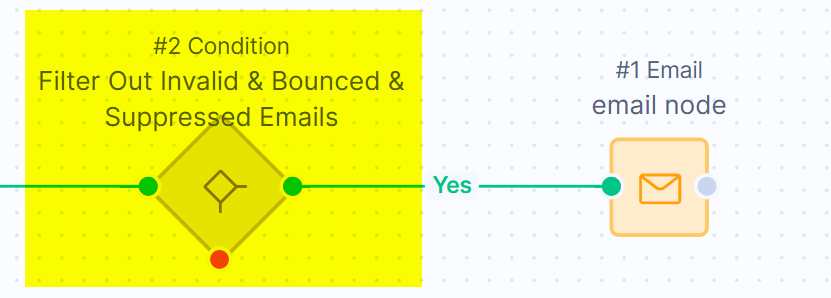
💡Bloomreach offers email suppression lists that allow automatic suppression of bad email addresses defined by suppression lists, like email typos, temporary email domains, etc.
⚠️However, If you enable automatic suppression, any customers entering the email node will generate a suppression event—which counts toward your monthly processed events (MPE). To optimize costs, filter out emails that will be suppressed before they enter the email action node.
2.) Use Double Opt-in and Suppress Inactive & Risky Emails
Even if an email passes initial validation, it can still become risky over time due to inactivity, domain changes, or bounce history. Maintaining a "Do Not Send" list helps protect your sender reputation and ensures your campaigns reach engaged recipients.
Maintain a “Do Not Send” list to filter out:
❌ Hard bounces → Permanently invalid emails that should never be retried.
❌ Cumulative soft bounces → Temporary failures that could become permanent, such as:
Full inbox errors (recipient’s mailbox is full for multiple sends).
Domain issues (e.g., missing MX records, invalid domains).
❌ Unengaged users → Contacts with no opens or clicks for 12+ months.
💡 Why?
Hard bounces damage the sender's reputation, reducing inbox placement for future emails.
Repeatedly emailing unengaged users increases spam filtering risks and lowers your deliverability rates.
Inactive subscribers reduce email performance metrics, making campaign optimization harder.
📌 How to Implement:
✅ Monitor bounce reports in your ESP or CDP and move hard-bounced contacts to a suppression list.
✅ Regularly analyze engagement metrics (open rates, click-through rates) to track inactive users.
✅ Suppress users with multiple soft bounces (e.g., 3+ failures in a row).
✅ Exclude Disposable email domains.
This guide will walk you through email validation strategies, if you need help with Deliverability & Inbox Placement feel free to read the following article.
💡 How Bloomreach can help automate this process by:
Automatically invalidating hard-bounced or pre-blocked contacts to prevent future sends.
Applying cumulative bounce logic (only for Mailgun) to track and remove addresses with multiple soft bounces.
Offering email list hygiene filters and suppression lists to exclude risky or unengaged contacts before they enter an email campaign.
Conclusion: Why Email Validation Matters
Handling email hygiene filters, suppression lists, and validation automation might seem like a minor technical task, but in reality, it plays a critical role in email marketing success.
By investing time in list validation and hygiene processes, businesses can:
✅ Improve sender reputation → Fewer bounces & spam complaints keep emails landing in the inbox.
✅ Enhance campaign performance → Higher open and engagement rates lead to better conversions.
✅ Reduce unnecessary email costs → Avoid wasted sends & prevent MPE overages.
✅ Ensure a better customer experience → Minimize unwanted emails and maintain trust.
🚀 Automating the Process for Efficiency
Since manual email validation isn’t scalable, automating your list hygiene process is essential.
Email validation segmentation rules ensure that only verified recipients enter your workflows.
Pre-send suppression filters automatically remove invalid, bounced, or inactive contacts before an email is sent, preventing wasted costs and damage to the sender's reputation.
💡 If you want to go beyond basic validation and take this a step further, consider campaign prioritization—ensuring that high-value customers receive the most relevant emails first, while less-engaged contacts are gradually reintroduced to prevent email fatigue. By ranking campaigns based on urgency and engagement, you can optimize send frequency, improve open rates, and boost conversions.
📌 Email Validation Best Practices: Your To-Do List
💡 Before sending your next email campaign, run through this checklist to ensure your email list is in top shape.
✅ At the data collection stage:
Use
<input type="email">to enforce basic email formatting.Apply regex validation to catch formatting errors before submission.
Add CAPTCHA to prevent bot signups
Block disposable email domains to prevent spam sign-ups.
Implement double opt-in to confirm real users and reduce fake sign-ups.
✅ Before importing external email lists:
Flag Suspicious Emails in Bulk Lists
Use an Email Validation API
Use Double Opt-in and Run a Test Campaign Before Full Import
✅ Inside your system (ESP, CRM, CDP):
Filter Out Suspicious Emails Before Sending
Use Double Opt-in and Suppress Inactive & Risky Emails
Final Thought: Clean Data = Better Results
💡 A clean email list isn’t just a technical task—it’s a key driver of revenue and deliverability.
By keeping bad data out and ensuring only engaged users receive emails, you can improve:
🚀 Inbox placement → Higher deliverability & reduced spam risks
🚀 Marketing ROI → More real recipients = better engagement & conversions
🚀 Sender reputation → Lower bounces & complaints improve domain trust
A clean email list isn’t just about hygiene—it’s about delivering real results. At E3, we help businesses optimize their data quality, email deliverability, and marketing automation to reduce costs and maximize impact.
🔍 Struggling with email validation? Let’s connect and optimize your email strategy together!